The first version of the clinical trial simulator is online now.
It uses a dose-response model based on the Hill equation which basically is a saturation model. The assumption is that a cell is covered by a finite number of receptors. When the treatment is applied, a fraction of the receptors (depending on the dosage) is interacting with the treatment molecule and every interaction leads to a response. When every receptor is binding to the treatment, the response saturates.
It's based on the MSToolkit package and is hosted online at shiny apps under
Given a beta, how many patients need to be enrolled in a two-armed study of conventional against experimental therapy? Significance is set to 0.05, recruitment period and follow-up period can be defined together with median disease free survival times for the two study groups (implemented in R/Shiny):
Frequently, values are plotted against a categorical argument. The categorical argument can be thought of something like a weekday label or a step in a specific technical procedure ("Step 1", "Step 2", ...). Of course, these arguments could be converted to a numeric value used for plotting and after plotting, one would overwrite the x-axis labels to get the categorical data on the axis. But if Excel can do it, then it should be possible to do it in R as well. Here's how.
Here, the categorical data (x-axis) are five repeated measurements of diastolic blood pressure, denoted "DBP1", ..., "DBP5", where DBP1 is the baseline value. 40 subjects have been treated with either a hypertensive agent (A) or placebo (B). After averaging over treatment groups we end up with two groups we want to inspect.
> d <- aggregate(dat[, 3:7], by=list(TRT=dat$TRT), FUN=mean)
> d TRT DBP1 DBP2 DBP3 DBP4 DBP5 1 A 116.55 113.5 110.70 106.25 101.35 2 B 116.75 115.2 114.05 112.45 111.95
How can now d be plotted to immediately make the difference between the treatments visible? Lattice can plot multiple data records (the A- and B-rows) against categorical data, but for that, the data has to be in long format. This can be generated using the melt function from the reshape2 package.
> m <- melt(d, id="TRT", measure.vars=colnames(d[, 2:ncol(d)]))
> m TRT variable value 1 A DBP1 116.55 2 B DBP1 116.75 3 A DBP2 113.50 4 B DBP2 115.20 5 A DBP3 110.70 6 B DBP3 114.05 7 A DBP4 106.25 8 B DBP4 112.45 9 A DBP5 101.35 10 B DBP5 111.95
Using the code below, the code from a source file can be concatenated to a single string. This string however can still be printed and formates nicely on a JavaScript console.
It returns a string variable `s' and requires two command line arguments.
    filename = sys.argv[1]

    f = open(filename, "r")
    d = f.readlines()
    f.close()

    s = "var %s = " % sys.argv[2]
    s = s.strip()

    # s += '"' + "".join(d).replace("\n", "") + '";'

    cnt = 0
    n = len(d)

    # '\\n' is explicitly written to the 'source'-file such that
    # the JavaScript console can print the source code including line
    # breaks.
    for line in d:
        # First line.
        if cnt == 0:
            s += "\n" + '  "' + d[cnt].replace("\n", "") + '\\n"\n'
            cnt += 1
        # Inbetween lines.
        elif cnt > 0 and cnt < (n-1):
            s += '+ "' + d[cnt].replace("\n", "") + '\\n"\n'
            cnt += 1
        # Last line.
        else:
            s += '+ "' + d[cnt].replace("\n", "") + '"'

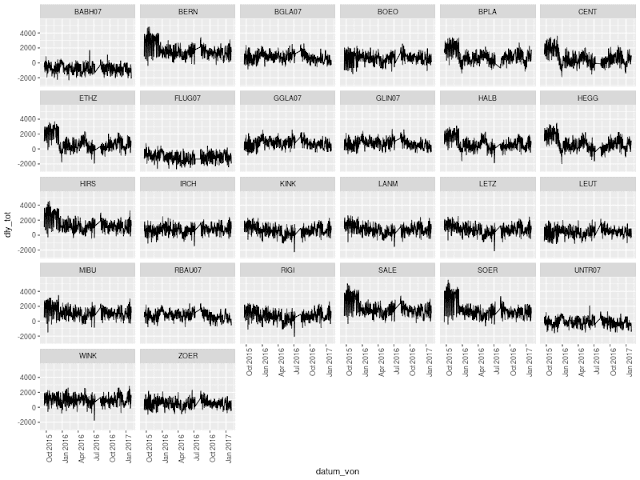 The analysis is an early result of the open data hackathon earlier this month. To be continued...

 It's based on the MSToolkit package and is hosted online at shiny apps under
 Github repository


