Posts mit dem Label pymol werden angezeigt. Alle Posts anzeigen

Dienstag, 13. Mai 2014

Illustrating protein structures

PyMOL can produce really nice protein structures.
Bacillus circulans xylanase with bound substrate (center).
This rendering uses ambient occlusion. The imporant settings are

set light_count, 10
set spec_count, 1
set shininess, 10
set sphecular, 0.25
set ambient, 0
set direct, 0
set reflect, 1.5
set ray_shadow_decay_factor, 0.1
set ray_shadow_decay_range, 2
unset depth_cue

What seems a bit tricky to get are the black outlines and depends on the background color setting.
The following command sequence seems to work, assuming the background is white when you start PyMOL.

1) set ray_trace_mode, 1 (color + outlines)
2) ray (outlines will be white)
3) bg black
4) ray (outlines will be white)
5) bg white
6) ray (outlines should be black)

This swapping of background is most likely not needed if you want to plot to a black background. I'm using PyMOL 1.3 and it could also be different in other versions.

If you use these instructions in your work, please be kind enough to credit this blog post.

Dienstag, 18. September 2012

PyMOL 006: Removing a bond between two atoms

PyMOL sometimes displays bonds which are not correct and can be confusing. To remove a bond between to atoms, first set the selection argument to "Atoms", then select the first atom involved in the bond and rename its selection identifier to, e.g., "atm1". Unselect the atom, select the second atom of the bond, rename the selection identifier to "atm2".
Then enter the following at the PyMOL prompt:

cmd.unbond("(atm1)", "(atm2)")

Be sure to include all parentheses and quotation marks.

Freitag, 13. Januar 2012

PyMOL 005: Partial structure optimization

PyMOL is amazing. Say you have a structure where, eg., water molecules are too close to your protein atoms. Maybe you want to optimize the water molecules (only the water molecules) by some crude approach before submitting to more sophisticated theory.
Here's how you can do it at the PyMOL prompt. You loaded the structure as "enz". The waters in "enz" all have the same id 500. So typing

select wat, enz/PROT/A/500/

should select your waters. "PROT" is some sort of segment and "A" is the chain of the structure, these depend and maybe need some adjustment in your system. Alternatively, try

select wat, enz///500/

Having selected the waters (if nothing else then manually), enter the following commands

cmd.protect('(not wat)')
cmd.sculpt_activate('enz')
cmd.sculpt_iterate('enz', cycles=5000)
cmd.sculpt_deactivate('enz')
cmd.deprotect()

The number of cycles can be adjusted. Also, it is possible to optimize locally only a side chain of one residue in the protein. Then you would enter

cmd.protect('(not enz///105/) or name C+CA+O+N+OXT')
cmd.sculpt_activate('enz')
[same commands like above]


Dont forget the trailing forward slash in the selection commands.

Dienstag, 14. Juni 2011

PyMOL 004: Illustrating a periodic system

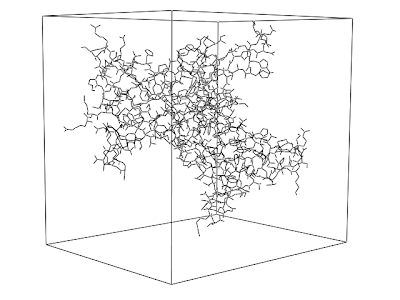
I have enclosed the structure inside a rectangular box. Now I would like to translate it in order to generate the image of a periodic plane.


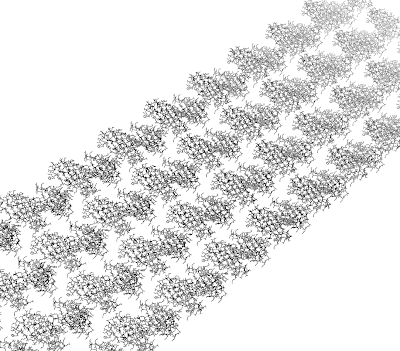
Using the supercell.py script on the PyMOL wiki, the following figure was generated. The command was
supercell 40,4,1, withmates=1
at the PyMOL prompt.


How can I have little boxes around all proteins?

After aligning all proteins on the surface, the output is the following.

Montag, 4. April 2011

PyMOL 003: Displaying Atom Coordinates

In PyMOL, the coordinates of atoms of a selection can be printed by first selecting the atoms of interest and then calling

PyMOL>iterate_state 1, sele, print name, x, y, z

where 'sele' is just the selection created when clicking on the atoms of interest.

Mittwoch, 30. März 2011

PyMOL 003: Synchronizing Atoms in PyMOL

  1. Show both structures as lines
  2. Show the rank of the atoms.
  3. Follow the backbone ranks of both files until they loose synchronization.
  4. Adjust one to the other, from now on always adjust this one to the other. Only one of the files is changed.
The way to do it is: atom with rank b in structure B corresponds to atom with rank a in structure A. Move the line corresponding to b to the line corresponding to a.

PyMOL 002: Description of the Program

When starting the work with PyMOL, it might seem odd that there is no such thing like an 'undo' button. But I believe this only seems odd because the user has expectations towards the program which it never intended to meet in the first place. Its not a program to use as one would use Word or any other Editor. In fact, I believe its intended to be used in the way one uses a black board. One quickly fills it up with notes, and then erases it to start over again with the next part of what one wants to write down, like in a lecture. One does not want to keep the black board in the way one wrote on it. If something is required to be recalled (e.g. because one wants to be able to present something at a meeting without having to search for all kinds of files) one can prepare a PyMOL session file.
Also, PyMOL is not a modeling program (even though its modeling capabilities are already quite impressive). Instead, its a viewer and an analysing tool which is extensible. And this is the most important part about it I believe. It is extremely friendly to the user who wants to extend it by his or her own functionality. All that is required is some knowledge about Python. The PyMOL API is quite introspective, so every function documents itself and this is really makes the extension work convenient.